
Real County Court Calendars Explained
There is no single master schedule for Real County court dates. iDocket's official help describes a calendar search for participating courts. You pick a court, then set the month, day, and year. It also warns that a calendar may omit activity and may change. Treat any result as a lead. It is not a promise the hearing will happen exactly as first shown.
Real County also splits its records by court. District matters run through the Real County District Clerk and the 38th District Court. County-court cases belong to the County Clerk or county office. Justice and traffic settings sit with the Justice of the Peace. The clerk's online page includes an event-calendar area. However, the clerk posts no detailed daily list there, and the county publishes no official posting schedule or public-terminal policy.
Real County iDocket Calendar Controls
The iDocket workflow is simple. Pick the participating court, set the month, date, and year, then hit View. Clear wipes those choices. Since exact Real County dropdown values are not listed, choose the court named on your notice or filing rather than guessing from the kind of dispute.
| Control | Use | Research limit |
|---|---|---|
| Court | Select the participating court | Required by the documented workflow |
| Month, date, year | Choose the calendar day | Each is a date selector |
| View | Run the calendar view | Results may change or omit activity |
| Clear | Reset the fields | Does not alter the court record |
The iDocket calendar documentation is also the source for the assigned interface image.

The vendor's calendar tools sit on the iDocket help page. For a live setting, the responsible Real County office is still the best source.
Finding Your Court Date
When the date truly matters, use every channel. The online calendar or case-history route is one option. Phone confirmation is another, along with the clerk's counter and a statewide hearing-search cross-check. The county does not promise a courthouse posting online. A filed notice or counsel may carry the setting too, so compare it with the newest court information.
- Open the Real County iDocket route and select the court and date, or use a name search to identify the case.
- Read the newest setting or notice in case history. Do not treat an older event as the current date.
- Cross-check a participating matter in re:SearchTX, where hearing search is documented, but Real coverage is not guaranteed.
- Call the responsible clerk or court. District settings use 830-278-3913; county dates use 830-232-5304 or 830-232-5202; JP dates use 830-232-6630.
- If online access fails, ask at the clerk's counter and ask whether a daily posting or public terminal is available.
Have the case number ready if you know it. Give staff the party name, court, and expected date range as well. Those facts help them separate cases sharing a name.
Real County Hearing Location Check
A Leakey records address does not prove a district hearing happens in Leakey. The 38th District Court page and the state directory place the court's primary location at 100 N Getty, Suite 17, Uvalde. Real County's District Clerk sits at 146 Highway 83 South in Leakey. That split makes a direct location check essential before any trip.
For a district setting, call 830-278-3913. Ask for the exact building, room, date, and time. For a county or JP setting, call the office that owns that docket. Never infer venue from the clerk's mailing address, a prior hearing, or the county named in the case. A court coordinator may know about a courtroom move before the public index catches up.
Note: Confirm the hearing site with the court. Real County records in Leakey can relate to a district setting administered from Uvalde.
How to Read a Court Setting
Match any Real County setting to the case and court before relying on it. iDocket confirms the calendar controls, but its public help does not promise every result column for Real County. Courtroom, judge, style, and setting type are fields to verify, not fields guaranteed on every screen.
| Date | The scheduled calendar date; compare it with any later notice. |
|---|---|
| Time | The stated appearance time, which may differ from a broad docket-call time. |
| Courtroom | The room or hearing place; not confirmed as a Real iDocket result field. |
| Judge | The assigned or presiding judge, subject to confirmation. |
| Setting Type | The purpose, such as a hearing, pretrial setting, or trial. |
| Case Number | The identifier used to match the setting to the correct file. |
A setting is not a disposition. The setting tells when an event is scheduled. A disposition records the outcome. Keep those dates separate when reading Real County case history.
Real County Clerk Calendar Notice
The Real County District Clerk page displays an "EVENT CALENDAR" area and tells readers to check back for additions and updates. It does not publish a complete daily court calendar. So work cautiously: check the online area, but use direct contact when the next setting must be current.
That same official page supplies the clerk's live contact details. It should take precedence over an older directory entry when office names conflict.
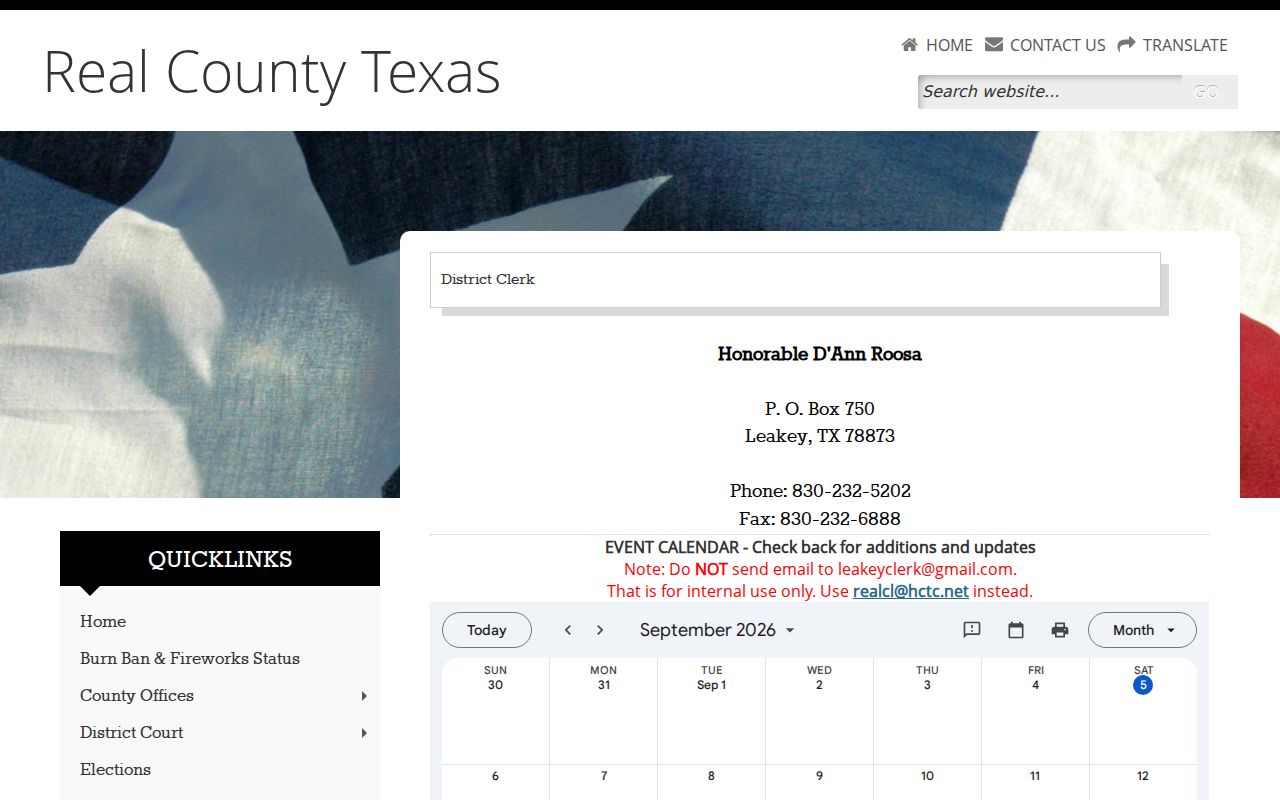
The event-calendar area on the clerk's page is not proof that every Real County hearing is listed there.
Continuances, Resets, and Cancellations
Continuances and resets move a Real County court date to a new day. The old entry often stays in the chronological docket anyway. That leftover line does not mean the date is still live. A cancellation can reach the court or coordinator before any vendor calendar catches up. Trust the newest case-history entry and any filed notice first. Then confirm with the court itself.
Never treat a vanished calendar line as a dismissal. A date that still appears in the history can be dead too. Real County's online tools are just an index and calendar aid. The court controls the real schedule.
When a date moves, write down who confirmed the change and when. Ask if a new written notice will issue. If you have a lawyer, send any conflicting dates to counsel right away.
Blank Real County Court Calendar
A blank Real County court calendar does not prove there is no hearing. The wrong court may have been picked. The date may have changed. The case may not be in the feed, or the calendar may skip that kind of event. Search the case history by name if you can. Then check the court named on the citation, pleading, or prior notice.
District civil, criminal, family, and juvenile matters belong to the Real County District Clerk at 830-232-5202, reached through realcl@hctc.net. Skip the older Gmail address; the clerk warns against it. County-court records go to the County Clerk at the same phone number. Justice, traffic, eviction, small-claims, and debt settings belong to the JP at 830-232-6630.
You can also put it in writing. Mail the correct clerk at its office box or visit the courthouse counter. Real County posts no general terminal guarantee or fixed daily-posting schedule, so ask first.
Real County Setting Terms
Calendar language can look final when it is not. Treat each term as a clue to the next event, then compare it with the newest notice. Real County publishes no code legend, so write terms out in full rather than guessing at abbreviations.
- Setting
- A scheduled court event tied to a date, time, and purpose.
- Notice of setting
- A filed or sent notice that a hearing, docket call, or trial has been placed on the calendar.
- Reset
- A change that moves the event to a new date.
- Continuance
- A court-approved delay of a proceeding.
- Disposition date
- The date an outcome is recorded, not merely the date of a hearing.
Read unfamiliar shorthand back to the clerk exactly as it appears on the docket. Staff can tell you whether it names a hearing type, a filing event, or a status.
If You Miss a Court Setting
Act at once. Call the court or clerk that holds the Real County case, explain the missed setting, and ask for the current docket status and the next lawful step. If you have counsel, contact your lawyer too. Never just show up at a building because an old calendar entry lists it.
Missed a setting? A missed appearance can carry serious case-specific consequences, so verify the docket with the responsible court without delay.
Ask whether the court entered an order, issued process, or set another date.
A licensed attorney can advise on the proper response and whether a personal appearance is required.
The Real County case lookup can help you find the docket number before you call. It cannot replace the court's direction after a missed setting, so take its answer to the clerk.